Project Overview
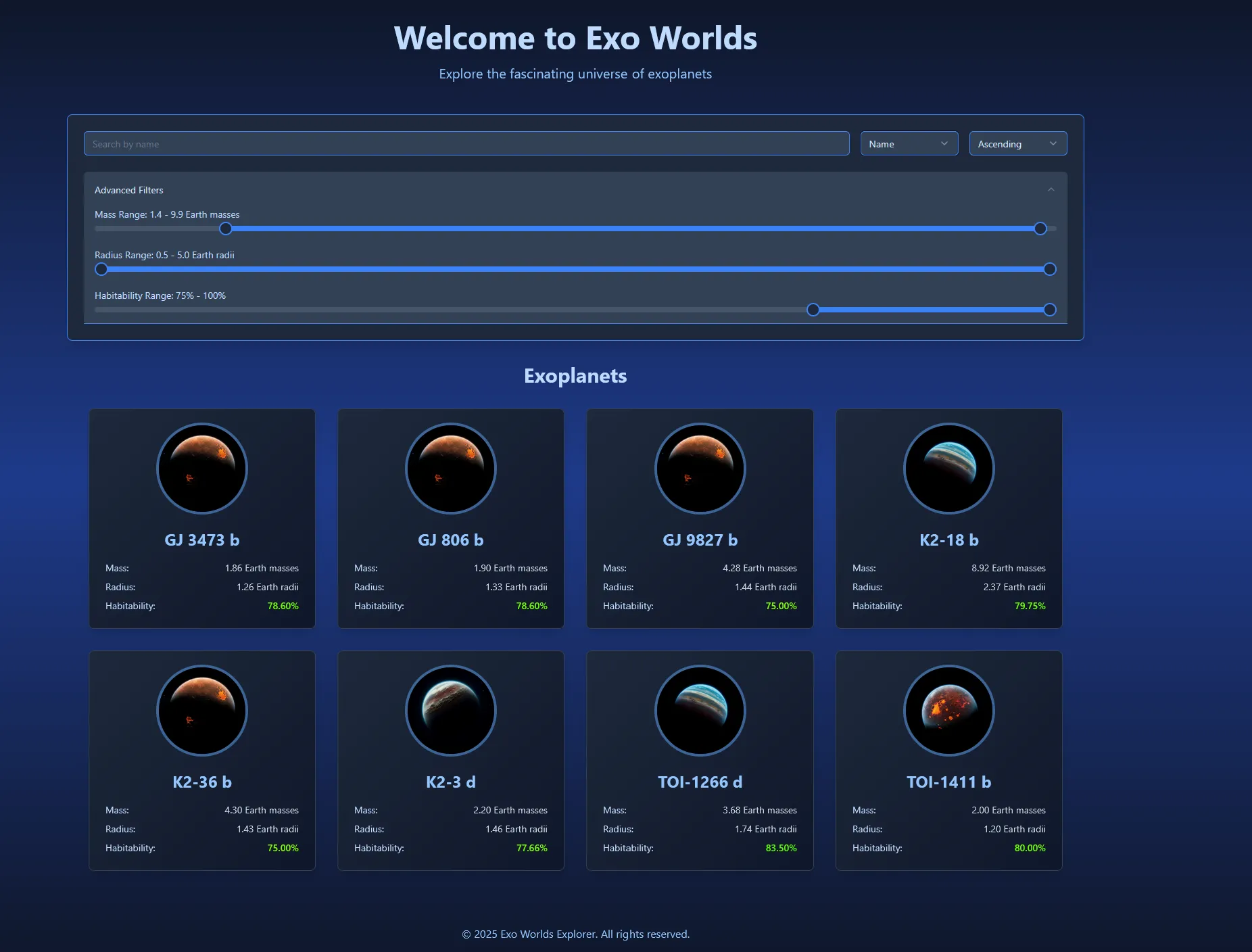
ExoWorlds Explorer is an interactive platform for browsing and analyzing exoplanets from NASA’s Exoplanet Archive. Users can filter, sort, and visualize planets across the galaxy—complete with AI-generated imagery that makes each discovery feel unique.
What began as a straightforward data viewer evolved into an experiment in combining astrophysics-inspired algorithms with a modern full-stack architecture. The app doesn’t just show raw planet data—it attempts to categorize worlds by a custom “Habitability Index”, letting users imagine which planets might be the most Earth-like. (Note: The habitability scoring is not accurate and is just for fun!)
Key Features
- 🔍 Advanced Filtering: Search planets by name, mass, radius, and habitability index.
- 🎯 Smart Sorting: Organize planets by multiple attributes with real-time updates.
- 🌈 Generated Planet Visuals: Each planet is paired with an AI-generated image, reflecting its classification.
- ♾️ Infinite Scroll: Smoothly browse thousands of exoplanets without lag.
- 🎨 Modern UI: Built with React, Tailwind CSS, and shadcn/ui for a sleek and responsive experience.
Technical Highlights
The application is powered by a GraphQL API built with Spring Boot and Kotlin, connected to a PostgreSQL database. I set up a custom data loader that queries the NASA Exoplanet Archive via their TAP service{:target=“_blank”}, processes JSON responses, and stores planets locally.
Each planet entry goes through a pipeline where parameters like radius, mass, orbital period, stellar properties, and density are extracted. A habitability index is then calculated to assign planets into categories. Finally, AI-generated imagery is linked to classifications, creating a visually engaging catalog.
The frontend, built in React + TypeScript, uses Apollo Client to communicate with the backend and renders a smooth browsing experience with infinite scroll and interactive filters.
What I Learned
This project deepened my understanding of:
- Docker setup for containerizing the entire stack (frontend, backend, database).
- Kotlin + Spring Boot, especially building a GraphQL API and structuring repositories.
- Database design and ingestion, handling large-scale JSON imports into PostgreSQL.
- Designing and implementing a habitability scoring algorithm, balancing scientific plausibility with playfulness.
- Connecting AI-generated assets to backend logic for immersive data visualization.
Challenges & Solutions
- Data ingestion from NASA’s TAP service: I needed to handle incomplete or inconsistent data. Solution: used
optDouble/optIntwith defaults and validation checks before saving planets. - Habitability Index: Creating a single metric from multiple astrophysical factors was tricky. I solved this by combining planetary and stellar parameters into a weighted function, classifying worlds into categories (from uninhabitable to potentially habitable).
- Performance: Infinite scrolling across thousands of planets was initially slow. I used Observer Intersection API, by tracking how many planets to display in the viewport.
Future Enhancements
- User-generated collections (e.g., “My Habitable Worlds List”).
- 3D visualizations of orbits and star systems.
- Enhance each planet’s detail page with more astrophysical data and research links.